Home
Home is the page your workspace opens on. It has an ask box you can type a plain question into, a list of what currently needs you, and a few suggested next steps. This page explains what each part does, what it needs, and what to check when it does not behave.
The parts, and what each one needs
| Part | What it does | What it needs |
|---|---|---|
| Needs you | Lists what is waiting on you, each row with a one-line reason | Nothing. Works on every plan |
| Next steps | Three to five cards built from those rows | Nothing. Works on every plan |
| Ask box | Answers questions about your chat and tasks, and can act after you confirm | The Pro plan, and an AI model configured for the instance |
Needs you and Next steps are not part of the paid assistant. They read your own work graph. If the ask box is unavailable, the rest of Home still works.
The ask box
Type a question in plain words. Examples that work well:
- What needs me today?
- Catch me up on chat.
- Brief me on my top task.
- What changed this week?
The answer streams back. While it works it shows what it is doing, one line at a time, so you can see which tasks or channels it looked at. Task references in the answer are links.
It reads across both your tasks and your channels, so a question that spans the two gets one answer instead of two searches.
It acts only after you confirm
The assistant can do four things that change something: create a task, comment on a task, post a chat message, and hand a task to an agent.
It never does any of them on its own. When it wants to write something, it stops and shows a card describing exactly what it proposes. Nothing happens until you press Confirm. Cancel discards it. At most three proposals appear in one answer.
It acts with your permissions, not elevated ones. It cannot do anything you could not do yourself.
Undo
After you confirm a created task or a created comment, you have fifteen minutes to undo it.
Two limits worth knowing before you rely on it:
- A posted chat message and a task handed to an agent cannot be undone. A message other people may have read, and a run an agent may have started, are not ours to retract. These show no undo button at all.
- Undo is refused if the item changed in the meantime. If somebody edited the task or replied to the comment after it was created, undoing would destroy their work, so it stops and tells you what changed.
Undo is also unavailable once the item has been deleted by someone else.
Limits
- Thirty questions an hour, per person per workspace.
- At most three proposed actions per answer.
- A long question may take a while: the assistant works in several rounds and gives up rather than running forever.
Needs you
Each row names the thing and why it is in front of you, for example "Mentioned you in #design, 2h ago", "Overdue since Tuesday", "Huddle live now", or an agent waiting on your answer.
Five rows are shown, with the rest behind a count. Agent questions come first, because a person is blocked on you. Overdue work comes next.
Next steps
Three to five cards, built from the same rows. Picking one fills the ask box with a question about that specific item, so the common case is two clicks and no typing. When the ask box is unavailable, only cards that lead somewhere directly are shown.
Agent work on Home
Home gives agent work its own area, and it is deliberately not a dashboard.
- The field is a band of marks, one per recent run, so a glance tells you whether anything is in trouble before you read a single row.
A mark is dim while a run is healthy and lit when it wants you, so the field is mostly quiet on a normal day. Runs that fell out get their own row rather than being mixed in, and the legend doubles as a filter: pick a kind and the rest dim, without hiding any rows.
A task is counted once, wherever it shows. The number at the top, the legend and the rows beneath it are one count read three ways, so they agree. Runs that fell out are counted beside the ones in flight rather than added to them, because a run that fell out is not still running. When the field holds more marks than it can draw, it says how many of how many it is showing rather than quietly drawing fewer.
- Rows that need a person are grouped by what they actually need: Questions, where the first answer wins; Needs a person; Pull requests waiting, which are merged on the host; From people; and Paused for an agent stopped by its budget.
- Healthy runs sit in their own box rather than as rows, because a run going fine does not need your attention.
- Finished today closes the page off.
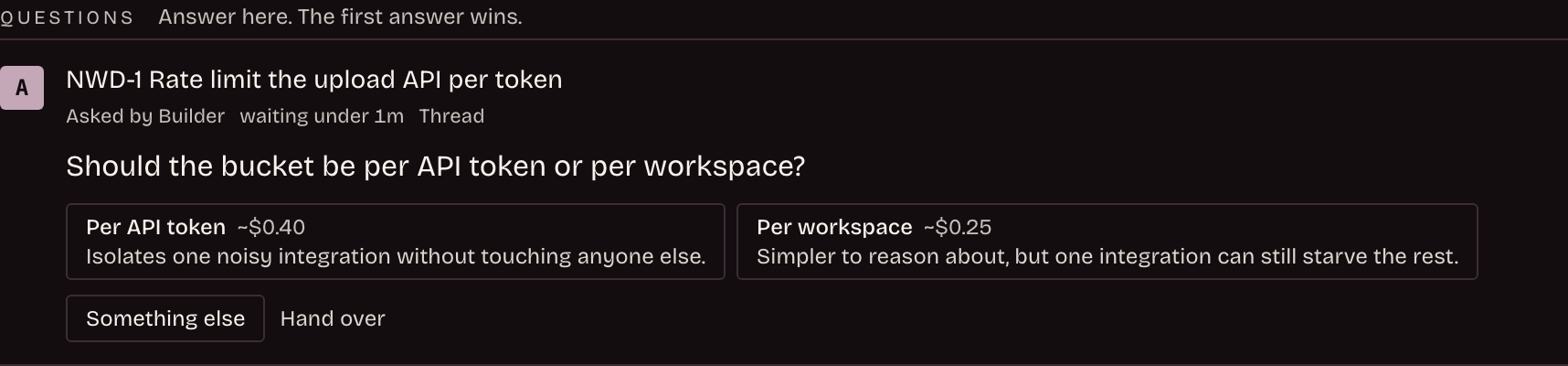
A question arrives with the options the agent sees, each with what it would cost, so you are choosing between known alternatives rather than guessing what it meant. The first answer wins.
Only runs on tasks in projects you are an active member of appear.
When an agent cannot work
An agent whose provider has a problem gets its own alert, naming the agent, what is wrong and when it resumes, with a link through to Agents. The wording is plain: "Builder cannot work: its provider's weekly limit is reached. It resumes Nov 22 at 11:00 UTC."
An agent that has gone quiet while tasks wait for it reads as offline, with the time it went. One whose last three runs all failed says so, with the last reason it gave.
These alerts are about agents running on your own runner. When a hosted session hits a provider problem, it ends as a failed run on the task instead, so it reaches you under Needs you rather than as an alert here.
The task the agent was on is not left for you to chase. It goes back to the queue and the agent starts it again once it can work, so a provider limit costs you a wait rather than any work. See Tasks and pull requests.
Guests see only that the agent is unavailable, with no reason and no reset time. Which limit a provider imposes, and whose key stopped working, is not a guest's business.
A run that opened no pull request
A run can finish without opening a pull request, either because it decided nothing needed changing or because it simply did not open one. The task stays with the agent briefly, since a pull request can land a moment after the run ends and taking the task away immediately would be wrong.
If none arrives, the task goes back to a person, with the line "The run finished without a pull request. Close the task, or reply to send it back." It is about half an hour, give or take a few minutes, and the task then appears under Needs a person like anything else waiting on you.
So a task sitting with an agent whose run has ended is not stuck. It is inside that window, and it will come back to you on its own.
A workspace that has never had an agent run is not shown an empty agent area. It works on every plan, like the rest of Home.
Opening a run
Clicking a run opens a sheet over the page with its steps, its cost and its controls, so you do not lose your place. The run view itself shows the trail beside the live step log.
The trail draws the chain on a vertical spine rather than listing it, so it survives a narrow screen. The step log beside it is what the agent is doing right now. On a phone the two stack, trail first.
While a run is live the view refreshes every five seconds. When nothing is live it drops to about once a minute, and it refreshes when you come back to the tab. A run view you have open stays on screen after the run ends rather than disappearing under you.
You can open a run of any age by its link, not just a recent one, as long as you can still see the task it belongs to.
Members of the task's project, and the person who delegated it, also get Stop and a message box here. See Stopping and steering a run.
How Home learns
Home notices which kinds of cards and rows you open, and moves those kinds up for you.
What it records is deliberately thin:
- The kind of thing, for example "overdue" or "brief task", and counts of how often that kind was shown and opened.
- Nothing else. Not task names, not message text, not anything you wrote. The kinds are a fixed list, and anything not on that list is discarded rather than stored.
What it does with that:
- It reorders within a group. Agent questions and overdue work keep their place regardless of your habits.
- It never hides anything.
- With little history, the order is the normal one.
The daily counts are kept for up to about ninety days, then deleted. There is no per-person breakdown anywhere in the product: the counts reorder your own page and nothing else.
Guests
Guests can ask questions and read the answers. They cannot make changes. The page says so rather than letting a guest discover it when a button fails.
If something is not working
| What you see | What it means |
|---|---|
| "The assistant is part of Pro." | The workspace is on Free or Starter. Needs you and Next steps still work. |
| "AI is not set up for this workspace yet." | The plan is fine and no model key is set. A workspace admin sets one in Settings, then AI. See Setting up AI. |
| "Too many questions right now. Try again in a minute." | You reached thirty questions in an hour. |
| "You do not have access to ask here." | You are not a member of this workspace. |
| "The assistant is not available right now." | Home could not reach the service to check. Reload, and if it persists it is worth reporting. |
Note that the plan is checked before the model configuration. A workspace that is both on Free and has no model configured will report the plan, not the model.
Self-hosted instances read their licence rather than a per-workspace plan. On a hosted workspace, an active trial counts as Pro while it lasts.