Git linking, status sync, and branch names
This page describes the mechanics that are identical for GitHub, GitLab, and Bitbucket once a provider is connected: how pull/merge requests link to issues, how a linked request moves an issue through its workflow, the branch-name helper, the inline linked-request panel on an issue, and the outbound completion comment.
For connecting a provider and the per-project setup, see GitHub, GitLab, and Bitbucket. None of the behavior below is active until at least one provider is connected on the instance and the workspace.
Throughout, "request" means a GitHub pull request, a GitLab merge request, or a Bitbucket pull request; the handling is the same unless noted.
Auto-linking by issue identifier
When a request's source branch name or title contains an Ithura issue
identifier, Ithura records a link between that request and the issue. An
identifier is a project identifier plus a number, like PAR-123. The scanner
matches a prefix of 1 to 12 letters/digits/underscores starting with a letter,
a hyphen, then digits (for example PAR-123, WEB-7).
Details that follow from how the match works:
- Both the branch name and the request title are scanned, so either one carrying the identifier is enough.
- Matching is workspace-wide. The prefix selects the project (case-insensitive), and the number selects the issue within that project. There is no per-repository binding: a request in any repository the connected app can see will link, as long as its branch or title names a live issue in the workspace.
- One request can name several identifiers and link to several issues at once.
- One issue can carry several linked requests at once (for example a fix and a follow-up).
- A prefix that does not name a project, or a number with no matching issue, is skipped.
The link stores the repository, request number, URL, title, author, status, and branch name. Later events for the same request refresh that stored metadata.
The linked-request panel on an issue
Open an issue and look under "Linked pull requests". Each linked request shows:
- the repository and number (for example
org/repo#42), - the request title,
- a status badge: open, merged, closed, or draft,
- a link out to the request on GitHub, GitLab, or Bitbucket.
From the same panel you can add a link by URL or remove any link. The count in the heading reflects how many requests are linked.
Manual linking by URL
To link a request that already exists, paste its URL into the panel's add field. To remove a link, use the trash control on its row. Both actions require the Member role or higher on the project. (Viewing the panel needs only Guest access.)
The URL parser accepts:
- GitHub:
https://github.com/{owner}/{repo}/pull/{number} - GitLab:
https://{host}/{group...}/{project}/-/merge_requests/{iid} - Bitbucket:
https://bitbucket.org/{workspace}/{repo}/pull-requests/{id}
The GitLab form is host-agnostic: the /-/merge_requests/ segment is the signal,
so self-managed GitLab hosts work without extra configuration. A manually linked
row starts with status "open"; the next webhook for that request fills in its
title, author, and real status.
Status automation
A linked request can move its issue automatically as the request changes state.
Built-in defaults
With no configuration saved, these defaults apply:
| Request event | Issue moves to | State group |
|---|---|---|
| Opened, reopened, or marked ready for review | In Progress | started |
| Merged | Done, and the completion date is stamped | completed |
| Closed without merging | Cancelled | cancelled |
| Converted to draft | No move (the link records the draft state) | none |
A group resolves to the project's first state in that group (by order), so it works even though every project names its states freely. If a project has no state in the target group, the issue does not move. An issue is only moved when the resolved target differs from its current state.
Routine request events that are not lifecycle changes (for example a new commit pushed, a label change, an edit) refresh the stored link metadata but never move the issue.
Entering and leaving Done
When an event moves an issue into the completed group, Ithura stamps the completion date. When a later event moves it out of the completed group (for example a merged request is reopened), the stamp is cleared. This matches how completing an issue by hand behaves.
Overrides and precedence
Overrides live in the git_status_mappings table. When resolving where an event
should send an issue, the most specific configured row wins, in this order:
- a row scoped to the specific project over a workspace-wide row,
- a row for the exact provider over a provider-neutral (
any) row, - a row naming a concrete target state over one naming a group.
If no row matches, the built-in default above applies.
What the settings screen exposes today
The configuration screen is "Pull request status sync" in Workspace settings -> Integrations. It is workspace-level and provider-neutral: one setting applies to GitHub, GitLab, and Bitbucket alike. It exposes three events (opened, merged, closed without merging) and lets you send each to a state group or choose "No change". Saving replaces the workspace-level mapping as a whole.
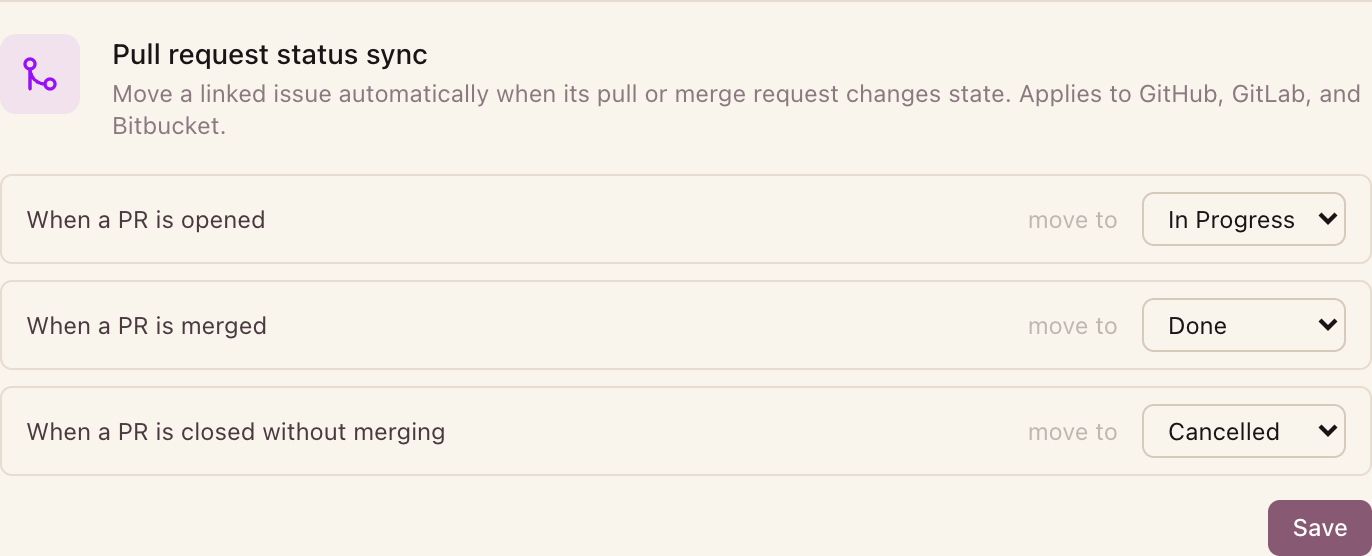
The data model can also hold per-project overrides, provider-specific rows, and rows that target one concrete state (see the precedence list above), and the automation engine honors all of them. The current settings screen does not create those narrower rows; they exist for future use and for direct data setup. Editing the mapping and the branch template requires the Admin role; reading them requires the Member role.
Branch-name helper
Each issue has a "Copy branch name" action (the branch icon) that copies a ready branch name to your clipboard. Name a branch this way and push it, and the link is made the moment the request opens, because the branch already carries the identifier.
The name comes from a per-workspace template. The default is:
{{workspace_slug}}/{{issue_id}}-{{issue_title_slug}}
which renders to something like acme/PAR-123-fix-login-redirect-loop.
Available variables:
| Variable | Example |
|---|---|
{{workspace_slug}} | acme |
{{project_id}} | PAR |
{{issue_id}} | PAR-123 |
{{issue_number}} | 123 |
{{issue_title_slug}} | fix-login-redirect-loop |
{{assignee_slug}} | jordan-lee |
The title and assignee slugs are lowercased, non-alphanumerics collapse to single hyphens, and the result is trimmed and capped at 50 characters. A workspace admin sets the template in Workspace settings -> Integrations ("Branch name template"); saving an empty template restores the default.
Outbound completion comment
When you mark a linked issue complete in Ithura from the UI (a fresh move into a Done-group state), Ithura posts a short comment back on every linked request, so reviewers see the work is done. The comment reads, for example:
Linked Ithura issue PAR-123 was marked complete.
Notes on when it fires:
- It fires only on interactive completion in the app, not on a completion that was itself driven by a webhook status transition.
- It posts to both linked GitHub pull requests (as the GitHub App) and linked GitLab merge requests (using the workspace's saved GitLab token).
- It is best-effort and informational: a failure to post does not affect the issue update.