Most teams run their day across two windows. The work lives in the tracker: tasks, sprints, the wiki, the boards. The talk lives somewhere else. So the decision that closed a task is a message in a different app, the task identifier someone pasted is dead text, and the person who needs to see it finds out in a thread they were not in. The two windows never reconcile, and the tracker slowly stops being the record.
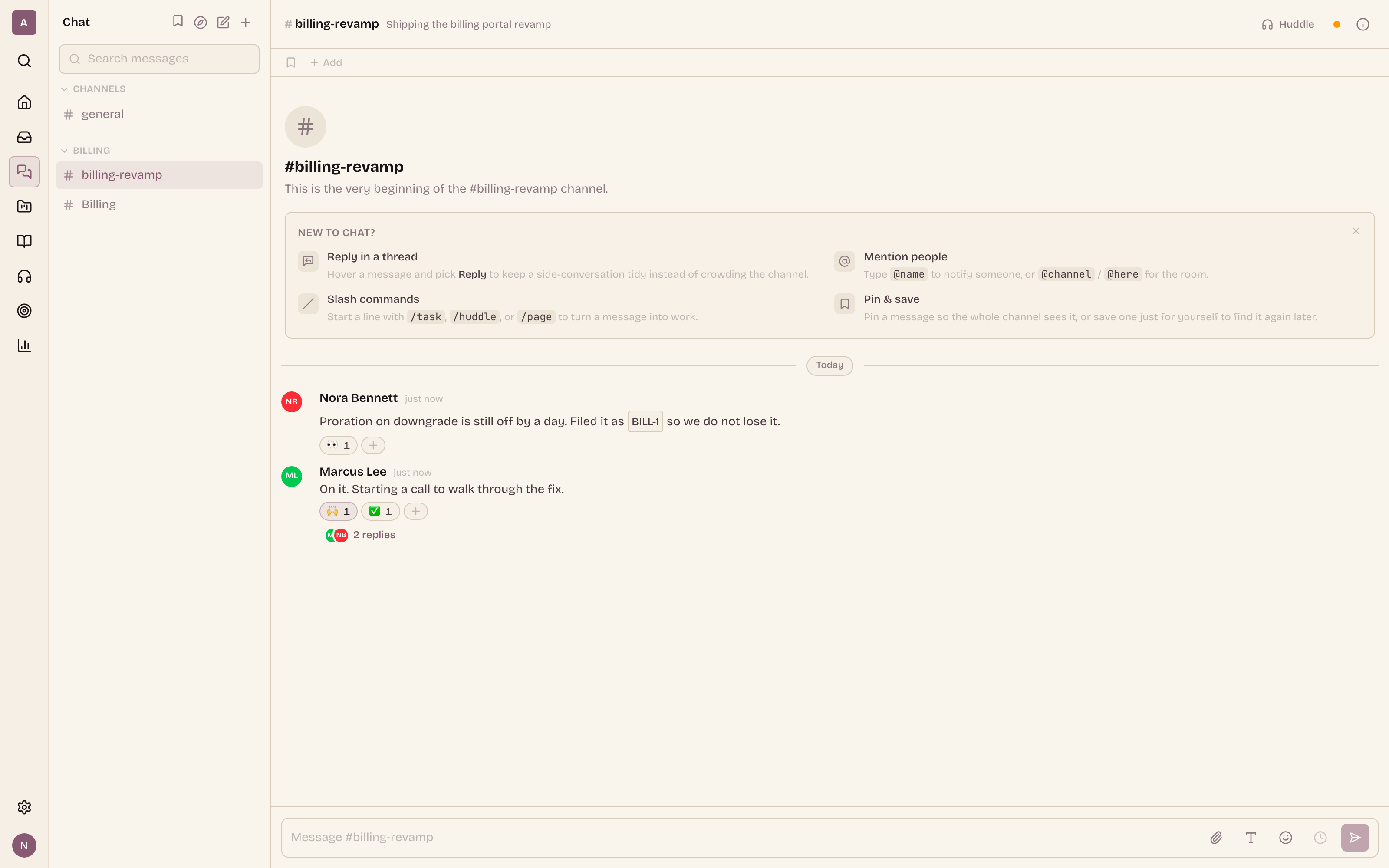
Ithura Chat closes that gap by refusing to be a second window. It is a full conversation surface, channels, direct messages, threads, reactions, the composer you expect, but every part of it is wired into the same work graph the rest of Ithura already runs on. A task identifier in a message is a live chip, not text. A slash command turns the message you are looking at into a real task. A mention lands in the same unified Inbox as every other notification and deep-links back to the exact message. That cohesion is the whole point.
The thesis: woven in, not bolted on
A chat feature is easy to bolt onto a tracker. You add a messages table, a socket, and a sidebar, and you have a room to talk in. What you do not have is cohesion. The message still does not know what a task is, the task still does not know the message exists, and you are back to copying links between two worlds.
Ithura Chat rides the same real-time hub, the same rich-text editor, the same permission model, and the same notification Inbox as tasks, wiki pages, and boards. That shared spine is what lets four things be true at once, and each of them is covered below:
- A message can become a task, a call, or a page reference without leaving the composer.
- A
#PROJ-42identifier means the same live thing in a message that it means in a task description, a comment, a wiki page, or a board node. - A chat mention is a first-class Inbox notification that deep-links back to the message, alongside your task and review notifications.
- Chat is reachable from global search and the command palette, the same two entry points you already use to jump anywhere in the workspace.
Channels that live where the work lives
Channels are scoped, not a flat pile. A workspace has its own set of channels for company-wide conversation, and every project carries its own channels that live with it. When you open a project, its channels are right there next to its tasks, its wiki, and its boards, because the conversation about a project belongs to that project.
- Public channels are open to anyone who can see their scope: a workspace channel to the whole workspace, a project channel to the project's members. Access is implicit, so there is no membership list to babysit.
- Private channels are invite-only. You seed the initial members when you create one, and only members carry a row that grants them in. Guests get in exactly the same way, by an explicit membership row, never by accident.
- Direct messages and group DMs sit beside the channels. A one-to-one DM shows a per-person read receipt; a group DM of three or more renders a stacked-avatar title and drops the per-person receipt, because in a group it stops meaning anything.
Every channel carries a topic and a set of pinned messages, and the Browse Channels view lists what you can join. Full-text search over a channel returns the matching snippet, not a bare list of hits, so you can read the answer before you click into it.
Turn a message into work
Type a leading slash in the composer and a command menu opens above it. These are acting commands that reach into the work graph, not text formatting. There are three, and they are deliberately few:
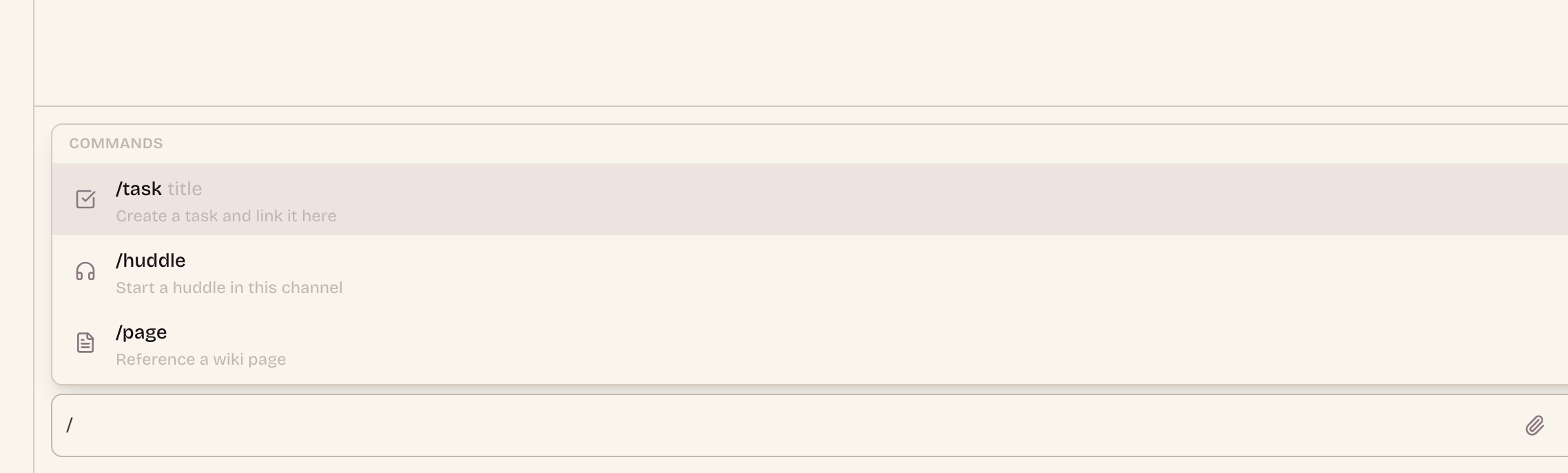
/task turns talk into a tracked task
Pick/task, type a title, and Ithura opens a create-task dialog pre-filled from the message, in the project the channel belongs to. The new task is stamped back onto the message as a linked entity, so the thread that spawned the work and the work itself stay connected./huddle starts a call in the channel
/huddleruns the moment you pick it. It starts a live call scoped to that channel, and everyone reading can join from the channel header. No scheduling, no separate link to paste./page references a wiki page inline
/pageopens a page picker. The page you choose drops in as an in-app link, and the message renders it as a preview card, the internal counterpart to a link unfurl.
The important detail is where these commands live. They sit at the composer level, layered on top of the shared rich-text editor rather than baked into it, so the editor that powers wiki pages and task descriptions is untouched. Chat gets acting commands; the wiki does not suddenly grow a /huddle block.
One chip, the same meaning everywhere
This is where woven-in stops being a slogan. Type #PROJ-42 in a message and it does not stay as text. The renderer resolves it to a live chip that shows the task's name, state, priority, and assignees on hover, and opens the task on click. It is the exact same chip you get in a task description, a comment, a wiki page, and a board node, because it reads from the same graph. A task moved to Done reads as Done in the message you referenced it in last week.
Paste a full in-app URL, to a task, a wiki page, or a project, and the message renders a compact preview card underneath it. These cards are permission-aware: each one fetches through your authenticated session, so a card only appears if you are allowed to see what it points at. A link you cannot open renders nothing, never a broken or leaky card.
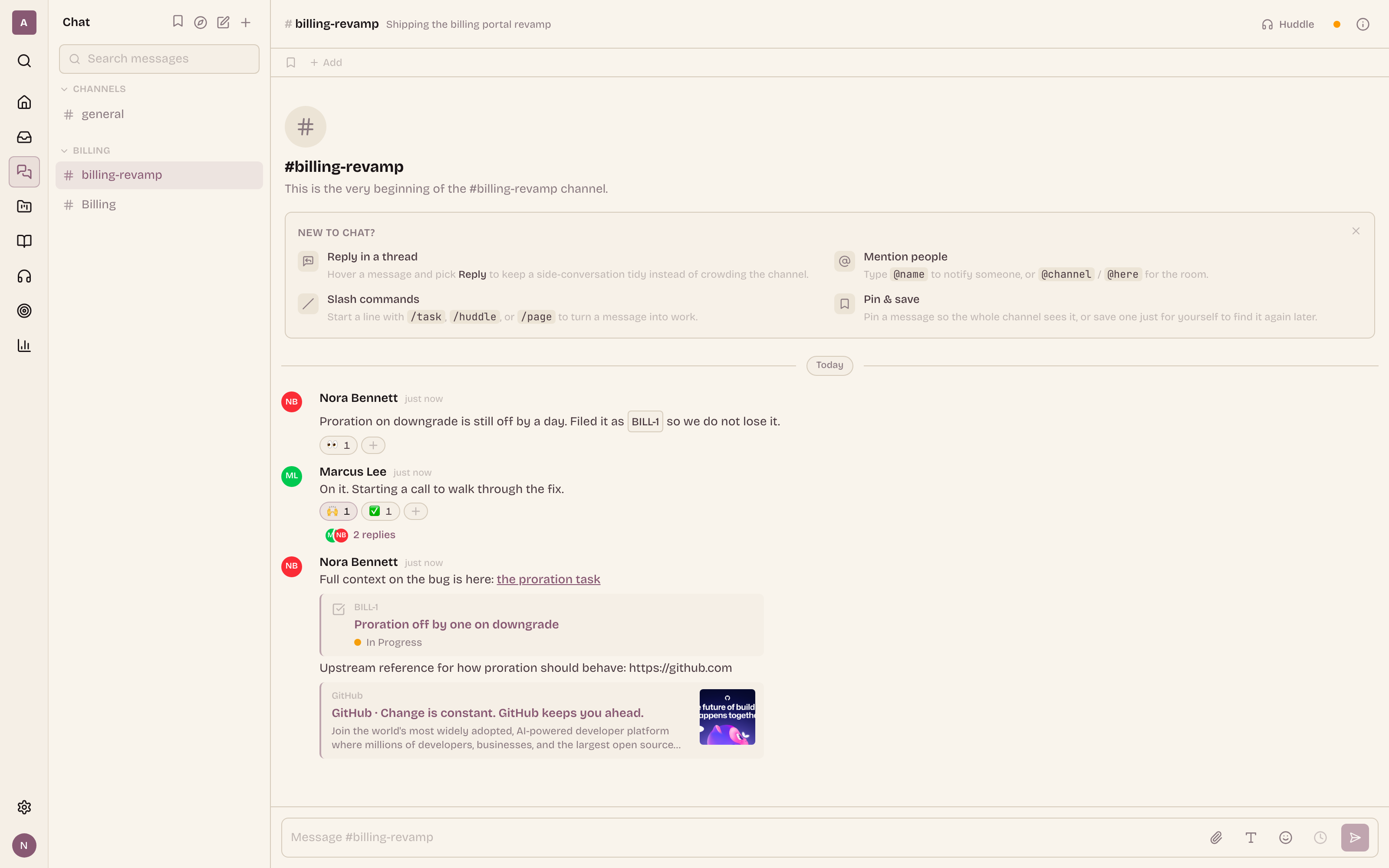
External links get the same treatment from the other direction. When a message contains a public URL, a background worker fetches the page and caches its title and OpenGraph metadata as a link-preview card. The fetcher is careful on purpose: it vets the resolved address, refuses to dial internal or blocked hosts, caps redirects, and holds a tight time and body budget, so an unfurl can never be turned into a request against your own network.
Threads, reactions, pins, and an honest edit trail
A channel stays readable because replies do not pile up inline. Replying opens a thread in a side panel, and the parent message shows its reply count, so a long discussion never pushes the rest of the channel off the screen. A thread participant keeps getting new replies even in a channel they have otherwise turned down.
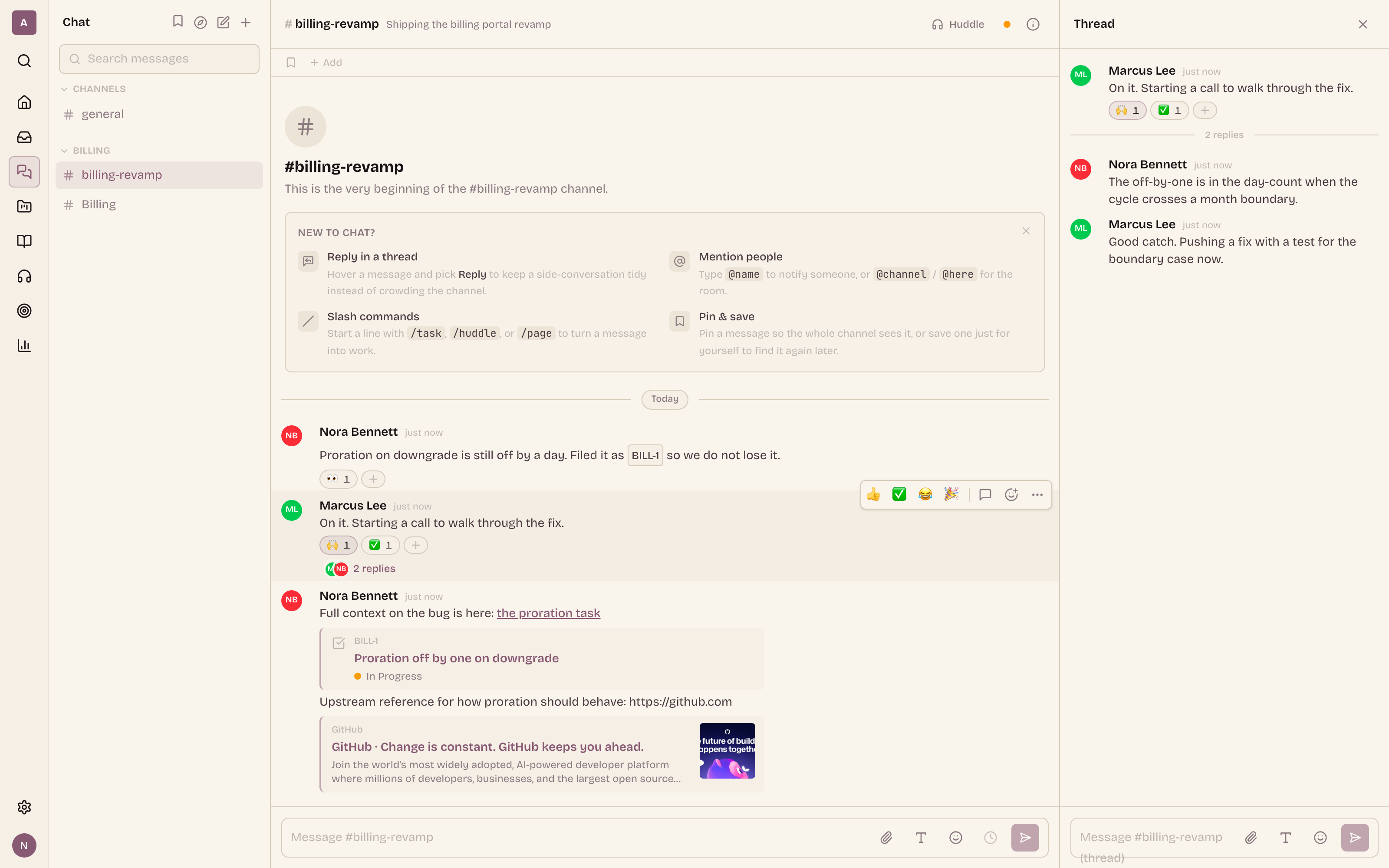
- Reactions are emoji grouped per message, with the full list of who reacted, folded into the timeline in a single query so a busy channel stays fast.
- Pins lift the messages that matter to the top of a channel. The pinned list carries when each message was pinned; the normal timeline does not, so pinning is a view, not an edit.
- Edit and delete are live. Editing a message keeps its history, so an edited message is honest about having been changed rather than silently rewritten.
A composer that gets out of the way
The composer is the rich editor the rest of Ithura uses, tuned for a chat line. It carries a formatting toolbar, an emoji picker, and inline mentions. Drag a file onto it, or paste an image straight from your clipboard, and it uploads to your workspace's own storage and attaches inline. The slash menu covering the acting commands lives here too, so composing a message and acting on the work graph are the same motion.
Mentions carry weight beyond a single person. @channel notifies every member of the channel; @here notifies only the members who have been active recently, so the loud broadcast and the "whoever is around right now" nudge are two different tools.
Mentions land in the one Inbox
A chat mention is not a separate notification silo. It is a row in the same unified Inbox as your task assignments, review requests, and comment mentions. The notification carries the channel, the message, and its sequence number, so opening it deep-links you straight to that message in that channel, not just to the channel's bottom.
Each recipient's channel preference shapes what they get. A channel can be set to notify on all messages, on mentions only, or be muted entirely. A muted channel still lights a dot on a direct mention, so muting quiets the noise without hiding the message that is actually about you.
Reachable from search and the command palette
Chat is not a room you have to already be standing in. The command palette has a Go to Chat action, and it searches your channels inline, so you can jump to a channel by name from anywhere in the app without touching the sidebar. Global search reaches messages and channels the same way it reaches tasks, pages, and boards. The conversation is part of the workspace's index, not a walled-off log.
Presence, Seen, and unread that lands in the right place
Presence dots ride the same live socket as the rest of the app, so you can see who is around in a channel or a DM. In a one-to-one DM, the peer's read cursor drives a Seen receipt, the same signal you expect from a messenger.
Unread is built on a monotonic per-message sequence, never on timestamps or UUIDs. Each member carries a last-read cursor, and the unread count is simply the messages past it. That is what makes the new-messages divider land in the same, correct place on every device you open the channel on, instead of drifting because two clients disagree on the clock.
On your terms: the quiet-hours and self-serve toolkit
Chat is only humane if you can shape how it reaches you and keep track of what matters to you. Ithura ships the full set:
- Saved messages and channel bookmarks. Save any message to a personal list you can open from anywhere, and pin a channel's key links into a bookmarks bar at the top of the channel.
- Scheduled send. Compose now and have a message go out at a chosen time; a background dispatcher promotes it into a real message at the send time, so it lands like any other message, not as a draft you have to remember.
- Reminders. Set a reminder on a message and Ithura nudges you about it later, so "I will deal with this after standup" actually happens.
- Do Not Disturb and quiet hours. Turn off interruptions outright, or define a daily quiet window (including one that wraps past midnight) in your own timezone. During quiet hours the interruptive Inbox row is suppressed, but the message is still recorded and the badge still moves. The signal is silenced, never lost.
- Keyword alerts. List the words you care about, and a message containing one earns an Inbox notification even when you were not mentioned. It respects Do Not Disturb the same way a mention does.
- Favorites. Star the channels and DMs you live in so they float to the top of the sidebar.
Huddles, right from the channel
When a thread is better said out loud, /huddle or the huddle button in the channel header starts a live call scoped to that channel. Everyone in the channel can join from the header, and the conversation stays where it started. No calendar invite, no external link, no context switch out of the work.
Where Chat fits with the rest of Ithura
The pattern here is the same one that runs through the whole product. The rich editor is shared with the wiki and task descriptions. The live socket is the same one that carries task, project, and board presence. The notification Inbox is the same one that catches assignments and reviews. The #PROJ-42 chip is the same chip everywhere. Chat is not a new app grafted on; it is the conversation layer of a graph you already had.
Related
- The release note, Chat: talk where the work already lives, for the shipped summary.
- The specs that stop lying, on the same one-graph idea applied to wiki pages that embed live task blocks.
- What you can build with Ithura, a tour of the surfaces Chat now sits alongside.