An error lives in one tool and the work to fix it lives in another. The crash shows up in Sentry, someone reads the stack trace, and then they open your tracker to file an issue, paste a link, and later remember to close it once the fix ships. The two systems never quite line up, and the issue is usually the last thing to catch up.
Ithura's Sentry integration closes that gap. It is a deep App, in the same family as GitHub and GitLab: no AI, no polling, just error data linked straight to a work item and its status kept in sync on its own. Link a Sentry error group to an issue, and when you resolve the error in Sentry the linked work item moves to Done by itself.
What it actually does
From a work item you search a Sentry organization's error groups and attach one (or several). Ithura stores a snapshot of each linked error, the short id, title, status, level, and last-seen time, so the panel renders without a live Sentry call, and links out to the error's permalink. A refresh control re-reads the current status on demand.
The direction is deliberately one way. Ithura reads error data from Sentry over its REST API and receives Sentry's webhooks. It never resolves, ignores, or otherwise changes anything in Sentry. Sentry stays the source of truth for the error; Ithura just keeps the work item in step with it.
Connecting it: two sides and a shared secret
Setup has a Sentry side and an Ithura side. You do the Sentry side once per organization, then paste two values into Ithura.
Create an internal integration in Sentry
In Sentry, go to Settings, Developer Settings, Custom Integrations, New Internal Integration. Name it (for example "Ithura"). Set Issue and Event permissions to Read, subscribe to the issue webhook resource, and set the Webhook URL tohttps://api.ithura.com/webhooks/sentry/<workspace-slug>/. Sentry then issues an auth token and, under Credentials, a client secret.Configure the Sentry card in Ithura
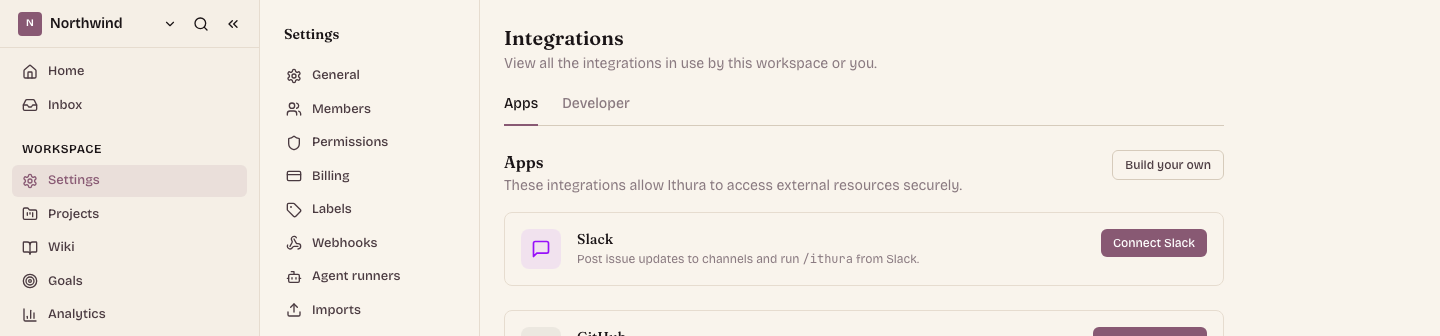
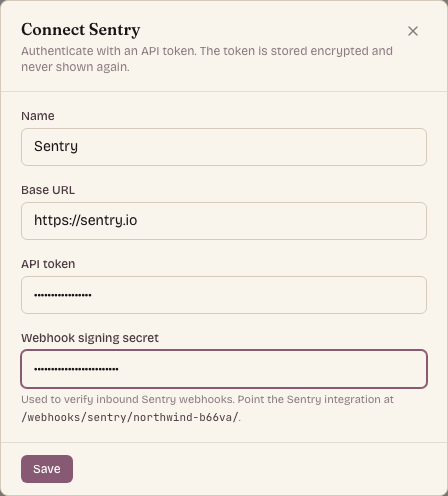
Open Workspace settings, Integrations, stay on the Apps tab, find the Sentry card, and click Configure. Paste the auth token into API token and the client secret into Webhook signing secret. The base URL defaults to sentry.io; self-hosted Sentry takes your own host. Save, then Test connection to confirm a live handshake.Let the signing secret do its job
That client secret is the whole trust model for the loop. Every webhook Sentry sends is signed with it, and Ithura verifies the signature with HMAC-SHA256 before acting. Both the token and the secret are stored encrypted and shown masked afterwards.
Linking an error to a work item
Open any work item and find the Sentry issues section on the issue detail panel. Click the +, search the connected organization's error groups, and attach one. The organization is taken from the connector, never from your input, so a search never leaks across orgs. The linked error then shows its short id, title, and status inline, with a link out to Sentry and a refresh.
Viewing the section needs Guest access; linking, refreshing, and removing need the Member role. When the workspace has no enabled Sentry connector, the section does not render at all, so the panel never shows a dead entry.
The payoff: the issue closes itself
A link is only half the value. The other half is that the work item moves on its own. When the error is resolved, ignored, or reopened in Sentry, Sentry delivers a signed issue webhook, Ithura verifies it, updates the snapshot on every linked work item, and moves each one through a mapping you set for the workspace.
Each Sentry status on the left maps to a work-item state on the right. The defaults are the obvious ones; reopening does nothing by default, so a flapping alert never yanks a work item backwards on its own.
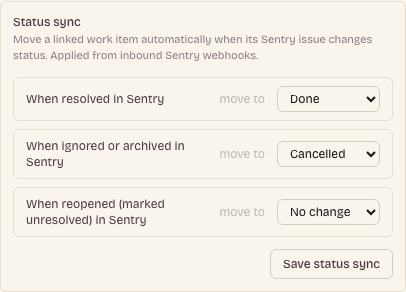
The mapping is three rows in the same Configure modal: when resolved, when ignored or archived, when reopened, each pointing at a state group or left as "No change". A group resolves to the project's first state in that group, so it works even though every project names its states freely. In testing, resolving an error in Sentry moved a linked Backlog item to Done within a couple of seconds.
That is the whole shape of the Sentry deep App: connect it once in the Apps tab, link an error to a work item, and let status keep itself in sync. No agent, no polling, no manual bookkeeping. When you fix the bug in Sentry, the issue on your board closes on its own.