When Ithura moves from a single team into a larger organization, the hard questions come from security and IT: can we put it behind our identity provider, can we provision and deprovision people automatically, and can we prove who changed what. Ithura answers all three. Every control below is scoped to a single workspace and managed by a workspace admin, so different parts of a company can hold different policies.
Put it behind our IdP, keep the directory in sync, and give us a record we can hand to an auditor.
Sign in through your identity provider
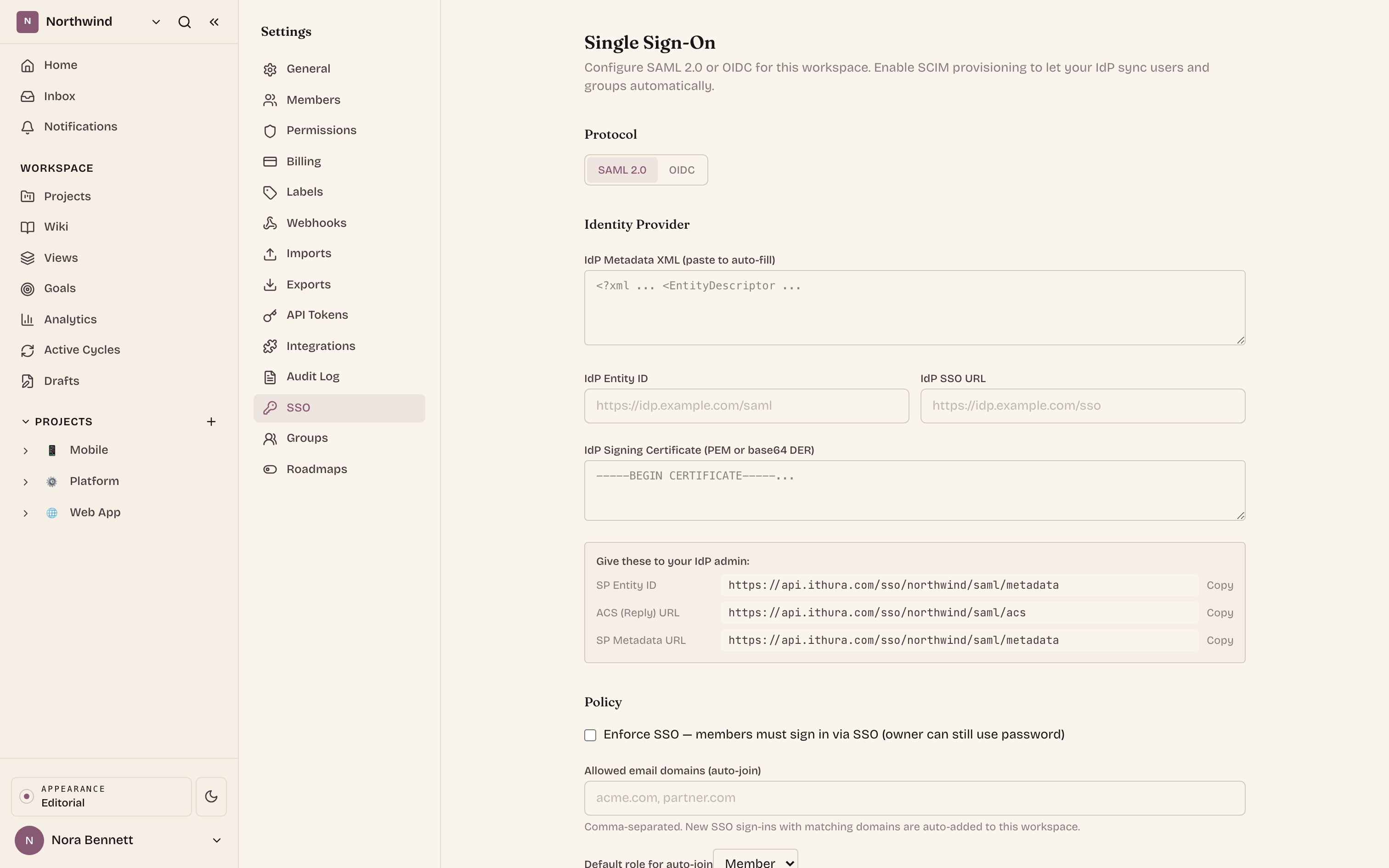
Single sign-on is per workspace and uses SAML 2.0. Members authenticate against your identity provider instead of an Ithura password. Ithura plays the service provider; your IdP stays the source of identity. When an assertion arrives, Ithura finds or creates the matching user by email and issues the session.
Hand Ithura your IdP details
Paste your IdP metadata XML and Ithura reads the entity ID, the SSO URL, and the signing certificate out of it. No metadata file? Fill the three fields by hand instead.Copy the three values Ithura gives back
On the first save, Ithura generates its own service-provider signing keypair and shows you the SP entity ID, the ACS reply URL, and the SP metadata URL, each with a copy button. Paste them into your IdP application, or just point the IdP at the metadata URL.Assign your users and test a sign-in
Assign people to the application in your IdP and run a test login. While you are still connecting, leave enforcement off so a password remains a fallback.
Enforced SSO, without lockout
Turn on Enforce SSO and members can no longer complete a password sign-in: the password endpoint returns an SSO_REQUIRED signal for them, so everyone comes in through the IdP. The workspace owner is always exempt, which means an admin cannot lock themselves out while tightening the policy.
You can also let the right people in automatically. List your allowed email domains, and a first-time SSO user whose domain matches is added to the workspace at the default role you pick (Guest, Member, or Admin). Leave the list empty to require an invitation first.
Provision people automatically with SCIM
SCIM 2.0 lets your directory push users and groups into the workspace directly, so a joiner is provisioned and a leaver is deprovisioned without anyone inviting or removing them by hand in Ithura. The direction is inbound: your IdP is the source of truth.
Setup lives in the same place as SSO. Configure SAML first, then read the SCIM base URL and generate a bearer token from the SSO settings page. The full token is shown once, so copy it into your IdP's provisioning connector right away; rotate or revoke it from the same screen. Creating a user adds a workspace membership at the default role, deactivating one suspends the membership, and groups map to workspace groups and their members.
Governance that holds on every request
Sign-in is only the front door. These controls are enforced on every request into the workspace by a governance gate, not just at login.
Two-factor enforcement
Require TOTP two-factor for every member. Anyone who has not enrolled or verified this session is pointed to the right step before they can work.
IP allowlist
Restrict access to one or more CIDR ranges. Malformed ranges are refused at save time, and the owner is never blocked by the list.
Session policy
Set a hard session lifetime and an idle timeout, so sessions expire on a schedule you choose rather than lingering indefinitely.
Custom roles and organizations
Define named roles between Member and Admin with a specific permission set, and group several workspaces under one organization to administer them together.
Custom roles graft onto the built-in Guest, Member, and Admin levels rather than replacing them: a custom role carries a base level plus a list of permission keys, and admins always hold every permission. Assign a role to individual members, and each caller can read their own effective permissions.
An audit log you can hand to an auditor
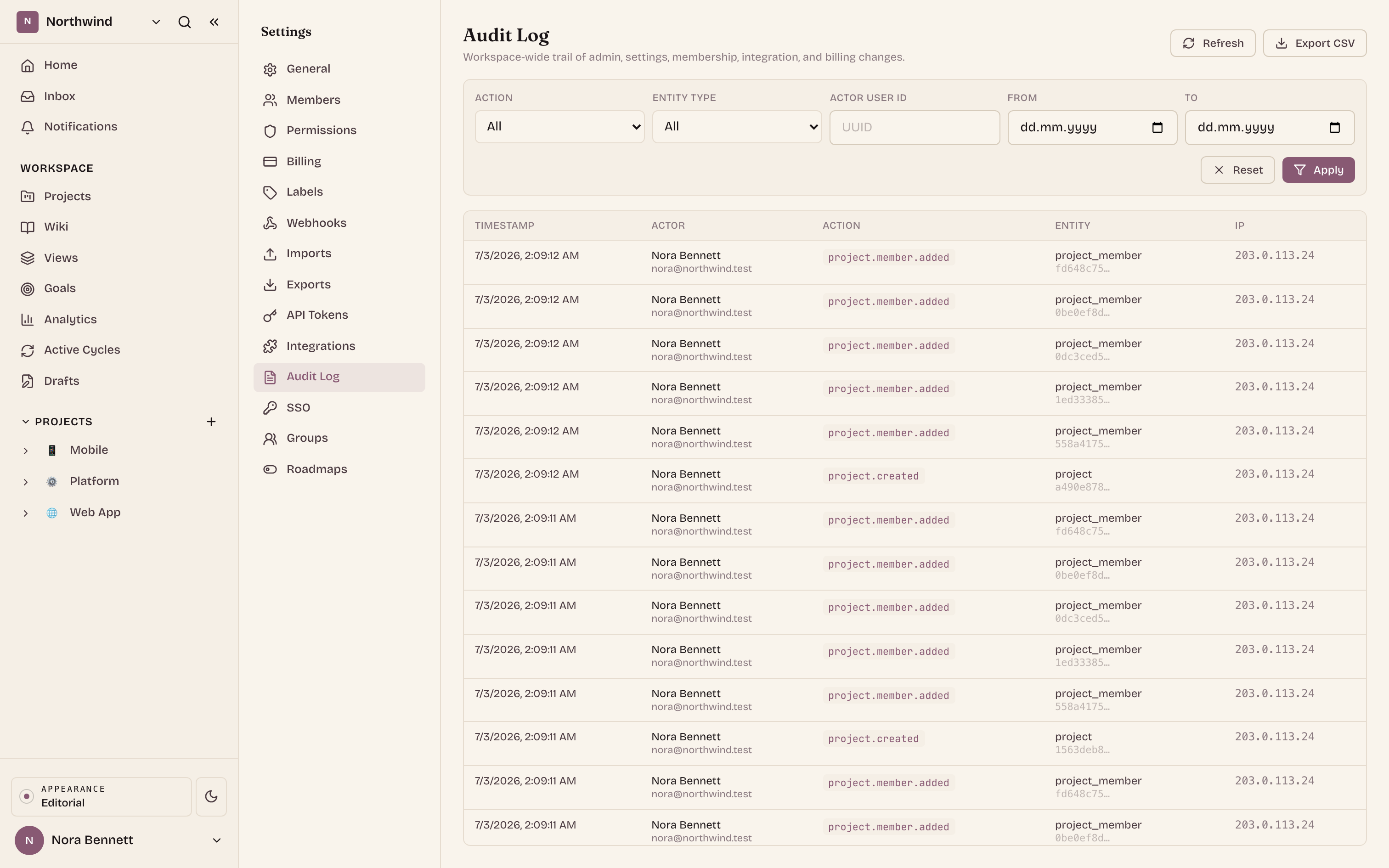
The workspace keeps an append-only trail of administrative and configuration changes. Each entry records the actor (a person or an API token, with a readable label), the action, the entity it touched, free-form metadata, the client IP, the user agent, and the timestamp. Expand a row to see the full metadata and user agent.
It covers the sensitive surface of a workspace: settings and permission changes, membership and invitations, projects created and archived, integrations installed and removed, API tokens issued and revoked, and billing checkouts. Filter by action, entity type, actor, and date range, page through with a keyset cursor, and export the loaded rows to an RFC 4180 CSV.
See the three surfaces
The same settings area covers sign-in, provisioning, and the record. Switch between them with the tabs or the arrow keys.
Ithura acts as the SAML service provider. Save your IdP details once and it returns the three values to paste into your IdP application.
SP Entity ID
ACS (Reply) URL
SP Metadata URL
What you need to buy
The enterprise controls split across two plans. Here is the short version so you know what your workspace needs.
- Pro covers single sign-on (including enforced SSO), two-factor enforcement, the IP allowlist and session policy, custom roles, organizations, and the audit log with CSV export.
- Enterprise adds SCIM 2.0 user and group provisioning.